


HDMI vs DisplayPort: Which one is Betterr?
Cables may not be the most exciting part of your setup, but choosing the right one can make all the difference in performance. Whether you're setting up a gaming rig, industrial workstation, AI system, or home theater, the choice between HDMI and DisplayPort isn't just about plugging in-it's about getting the best visuals, speed, and compatibility for your needs. HDMI is everywhere, from TVs to gaming consoles, while DisplayPort is favored for high-performance monitors and industrial computing. But which one is right for you? Let's break down their differences, strengths, and best use cases so you can connect smarter.

What is HDMI?
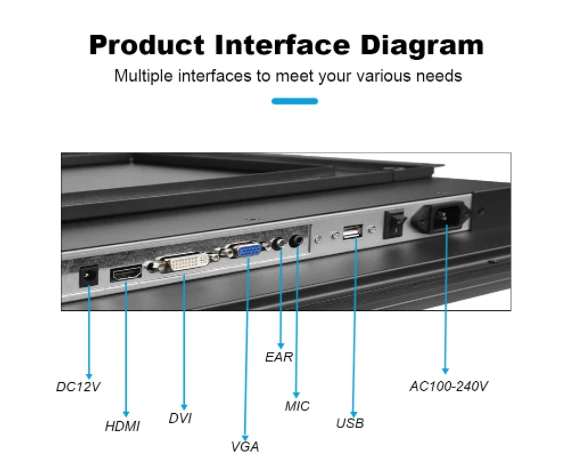
HDMI (High-Definition Multimedia Interface) is the most widely used digital display and audio interface today. It allows high-quality video and audio transmission over a single cable, making it a go-to choice for TVs, gaming consoles, laptops, industrial displays, and home theaters.
DisplayPort (DP) is a high-performance digital video and audio interface developed by VESA (Video Electronics Standards Association) in 2006. It was designed to provide superior display quality, high refresh rates, and multi-monitor support, making it the preferred choice for PCs, gaming monitors, industrial computers, and AI computing applications.
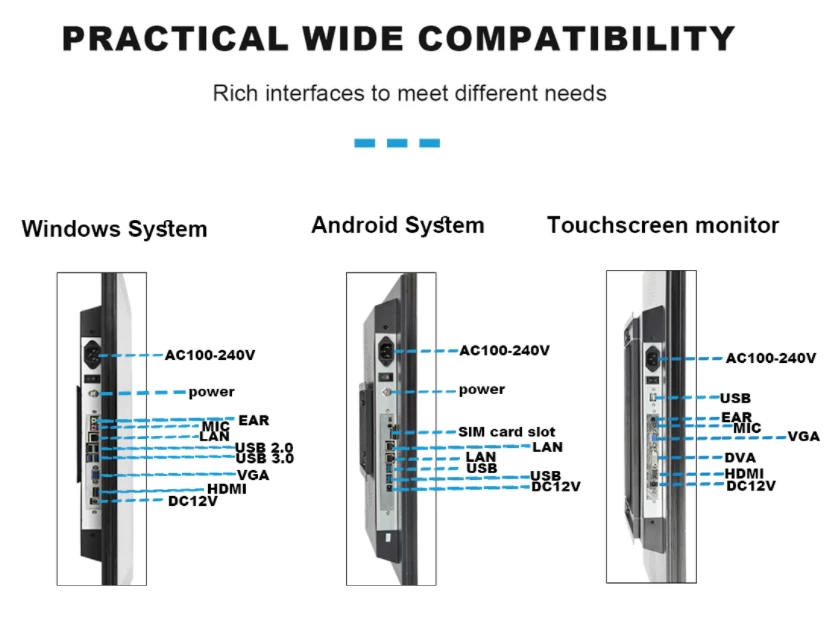
What is the difference between HDMI and DisplayPort?
When choosing between HDMI (High-Definition Multimedia Interface) and DisplayPort (DP), it's important to understand their differences. Both transmit high-quality video and audio, but they are designed for different applications.
1. Bandwidth & Resolution
| Interface | Max Resolution & Refresh Rate | Bandwidth |
| HDMI 1.4 | 4K at 30Hz | 10.2 Gbps |
| HDMI 2.0 | 4K at 60Hz | 18 Gbps |
| HDMI 2.1 | 8K at 60Hz, 4K at 120Hz | 48 Gbps |
| DisplayPort 1.2 | 4K at 60Hz | 17.28 Gbps |
| DisplayPort 1.4 | 8K at 60Hz | 32.4 Gbps |
| DisplayPort 2.0/2.1 | 16K at 60Hz, 8K at 120Hz | 80 Gbps |
Conclusion: DisplayPort offers higher bandwidth and supports greater resolutions compared to HDMI, making it the better choice for future-proofing, high-performance monitors, and AI-driven applications. However, HDMI 2.1 is still a strong choice for gaming consoles and entertainment setups at 4K 120Hz.
2. Multi-Monitor Support
| Feature | HDMI | DisplayPort |
| Max Monitors per Port | 1 | Up to 4 (with MST-Multi-Stream Transport) |
| Daisy-Chaining | ❌ No | ✅ Yes (MST) |
Conclusion: If you need a multi-monitor setup, DisplayPort is the better choice as it supports daisy-chaining multiple displays via MST (Multi-Stream Transport). HDMI requires additional adapters, making it less convenient for multi-screen productivity or industrial applications.
3. Adaptive Sync & Gaming Performance
| Feature | HDMI | DisplayPort |
| AMD FreeSync Support | ✅ Yes (HDMI 2.0+) | ✅ Yes |
| NVIDIA G-Sync Support | ⚠️ Limited | ✅ Full Support |
| Max Refresh Rate | 120Hz (HDMI 2.1) | 240Hz+ (DP 1.4 & 2.0) |
Conclusion: For PC gamers, DisplayPort is the best option, as it supports higher refresh rates (240Hz, 360Hz) and native G-Sync & FreeSync compatibility. However, HDMI 2.1 is perfect for console gaming (PS5, Xbox Series X), as it offers 4K at 120Hz with VRR.
4. Audio Support
| Feature | HDMI | DisplayPort |
| Supports Audio Transmission | ✅ Yes | ✅ Yes |
| Advanced Audio (Dolby Atmos, DTS:X, eARC) | ✅ Yes (HDMI 2.1) | ❌ No |
Conclusion: If you're setting up a home theater system, HDMI is the clear winner due to support for advanced audio formats like Dolby Atmos and eARC. DisplayPort can transmit audio, but it lacks high-end audio features found in HDMI.
5. Physical Connector Differences
| Feature | HDMI | DisplayPort |
| Number of Pins | 19 | 20 |
| Locking Mechanism | ❌ No | ✅ Yes |
| Common Devices | TVs, Consoles, Laptops | Monitors, Workstations, Industrial PCs |
Conclusion: DisplayPort is physically more secure, thanks to its locking mechanism, making it ideal for industrial PCs, workstations, and mission-critical applications. HDMI is more common and user-friendly, but the lack of a locking mechanism may lead to accidental disconnections.
6. Cable Length & Signal Quality
| Cable Type | Max Length Without Signal Loss |
| HDMI Passive Cable | 15 meters (50 feet) |
| HDMI Active Cable | 30+ meters (100 feet) |
| DisplayPort Passive Cable | 3 meters (10 feet) |
| DisplayPort Active Cable | 15 meters (50 feet) |
✔ Conclusion: HDMI is the better choice for long-distance connections (e.g., home theaters, projectors), as passive HDMI cables can reach up to 15 meters, while DisplayPort cables lose signal quality beyond 3 meters unless you use an active cable.
7. Best Use Cases
| Use Case | Best Choice | Why? |
| TVs & Home Entertainment | HDMI | Universal compatibility, built-in audio, eARC. |
| Gaming (Consoles - PS5, Xbox) | HDMI 2.1 | Supports 4K at 120Hz and VRR. |
| Gaming (PC) | DisplayPort | Higher refresh rates, native FreeSync & G-Sync. |
| Multi-Monitor Setup | DisplayPort | Supports daisy-chaining (MST). |
| Industrial & AI Computing | DisplayPort | Higher bandwidth, better stability for AI workloads. |
Conclusion: Conclusion: HDMI is the best choice for home entertainment and console gaming, while DisplayPort is better suited for gaming PCs, multi-monitor setups, and industrial computing.
Both HDMI and DisplayPort have their strengths, and the best choice depends on your specific needs. In short, if you need a universal, easy-to-use connection for entertainment, HDMI is the way to go. But if you're looking for high-performance computing, gaming, or professional applications, DisplayPort delivers better features and flexibility.
FAQs
Which is better, HDMI or DisplayPort?
+
-
It depends on your use case-HDMI is ideal for TVs, gaming consoles, and home theaters, while DisplayPort is preferred for gaming PCs, multi-monitor setups, and industrial applications due to higher refresh rates and better multi-display support.
What are the disadvantages of DisplayPort?
+
-
Less common on TVs and gaming consoles (HDMI is the standard for consumer electronics).
Shorter cable length support (Passive DP cables degrade beyond 3 meters, unlike HDMI).
Fewer built-in audio features (No eARC support for high-end home theater setups).
Does DisplayPort provide better quality than HDMI?
+
-
Yes, DisplayPort supports higher bandwidth, refresh rates, and resolutions, making it better for high-performance gaming, AI computing, and multi-monitor setups.
Can I use an HDMI to DisplayPort adapter?
+
-
Yes, but direction matters. Passive adapters work from DP → HDMI, but HDMI → DP requires an active adapter.
Do I need a special cable for HDMI 2.1 or DisplayPort 2.0?
+
-
Yes, you need Ultra High-Speed HDMI cables for HDMI 2.1 and DP 2.0-certified cables for DisplayPort 2.0 to get full performance.
Is HDMI or DisplayPort better for industrial and AI applications?
+
-
DisplayPort is better because it handles higher resolutions, supports MST for multi-displays, and has a locking mechanism for secure connections.
Is DisplayPort replacing HDMI in the future?
+
-
No, HDMI will likely remain the standard for TVs and consumer electronics, while DisplayPort will continue to dominate in gaming, professional workstations, and industrial computing.
-
304 stainless steel meets the international requirements of food grade,316 stainless steel is not only food grade or medical grade. However,the use of this medical grade as a production cup will not bring additional benefits to everyone. Why is it called 304 or 316? This is mainly defined according to the material composition. 316 stainless steel is not similar to mineral materials,after use can release some substances to promote human absorption.
First-class professional team for you to recommend products more in line with your needs. Perfect after-sale services exempt your worries.
Our address
No.5F, Building 24, Longbi Industry City, Bantian Street, Longgang District, Shenzhen City, Guangdong Province, China
Phone Number
+86-755-28447130
+8613632535154
sales@bestview.cc

32 inch touch screen computer monitor,aio touch screen pc,all in 1 computers touch screen,pc desktop touch screen,aio touch screen computer,computer front panel,computer monitor panel,computer screen panel,cpu front panel,flat panel computer monitor,front panel of pc,front usb panel for pc