


Why Choose Us
Bestview has strong R&D capabilities in software, hardware, structure, etc. combined with nearly 20 years of production and R&D experience, can customize all the display field products in almost all applications. We specialize in producing Fanless Mini Industrial Computer, Fanless Computer, Industrial Mini PC Fanless, Fanless Industrial PC, Fanless Mini PC, and other Industrial Box PC.
Rich Experience
Bestview has more than 17 years of R&D and production experience in the professional field of LCD display. It has customized and developed display and peripheral products with various functions and requirements in various fields for more than 80 countries around the world.
Professional Technical Team
Bestview has more than 20 structural engineers, hardware engineers, software engineers, process technology and test engineers with many years of research and development experience.
Quality Assurance
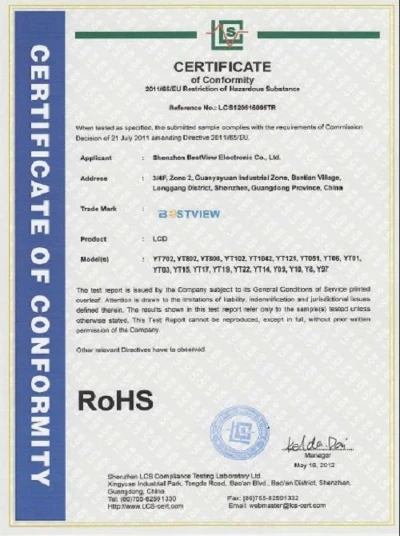
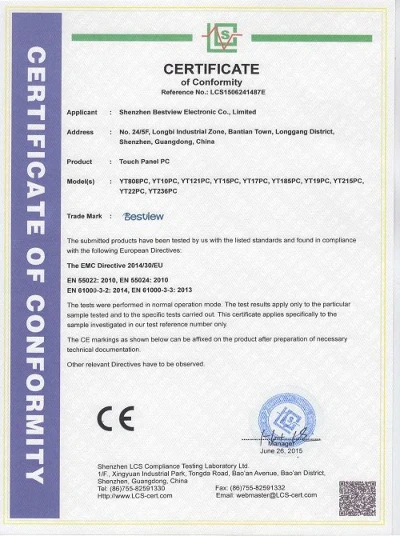
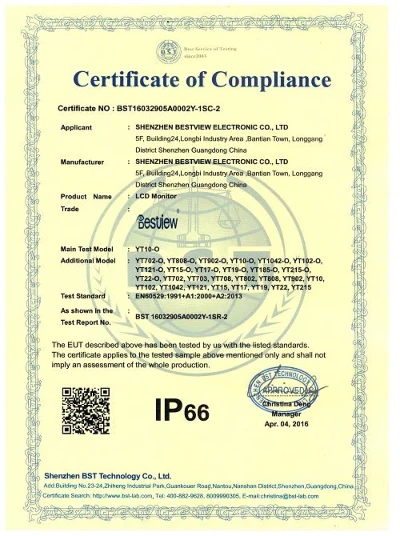
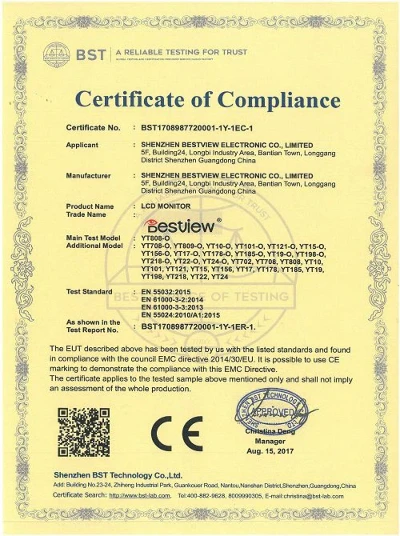
Under the BQMS quality management system of Bestview, Combine ISO9001:2015 quality management system, control every link, and meet the product standards and certification requirements. Make sure to meet your quality requirements!
OEM Available
Has customized development such as: FPGA logic circuit customization, SCALER circuit customization, power management circuit customization, and full waterproof, high brightness, shockproof, special interface function customization, ARM and X86 architecture deep development customization, Android and application customization, battery power customization, industrial and special industries in-depth customization, etc.
An industrial PC is a computer intended for industrial purposes (production of goods and services), with a form factor between a nettop and a server rack. Industrial PCs have higher dependability and precision standards, and are generally more expensive than consumer electronics. If you want to know the specifications and prices of Industrial Panel PC, please contact us!
Advantage of Industrial Box PC
Industrial Hardware
First, the hardware of an industrial computer differs from that of a consumer PC. Consumer PC hardware is subject to frequent changes by manufacturers, often without warning. On the other hand, industrial hardware has a much longer lifecycle, with product lines dedicated to the industrial sector and a long-term support guarantee. Typically, industrial PCs have a lifecycle of 3-5 years up to 10 years, which means that for this time, you won't have to worry about reconfiguring PCs with the correct settings every time you change hardware, and your production will run smoothly.
24/7 Operation
Working as a system and plant controller, computers used in the industry need to be operational 24 hours a day, even unattended. Using a consumer PC for this purpose leads to considerable damage to the device, overheating, possible power surges with the risk of downtime, and loss of production data. On the other hand, industrial computers are built and tested to guarantee 24/7 operation, even with low power consumption and under the harshest conditions. Additionally, industrial hardware is designed to avoid power surges and minimise the risk of failure.
High Performance Even in Harsh Environments
The application environment is one of the most important deciding factors when choosing a PC. Industrial production contexts often involve dust, chemicals, humidity, and wide temperature fluctuations, which could seriously damage a consumer PC and compromise its functionality, as it is designed for home use. Industrial computers, by contrast, are designed for such applications, guaranteeing high performance even in the presence of dust, production residues, and humidity, as they are completely fanless. Furthermore, thanks to their extended temperature range, they can tolerate temperature variations between -40°C and +85°C.
No Fan
The mechanical components inside computers, such as the fan, can be severely damaged if used in harsh environments. For example, if used outdoors or in humid, sub-zero temperatures, the mechanical parts can fail, causing the internal components to overheat and no longer dissipate heat. Besides, the cooling fans inevitably suck dust and moisture into the PC through the ventilation holes, thereby making the PC completely unusable and requiring repair. However, industrial computers are generally fanless (unless specifically requested by the customer) and dissipate heat through their case. Consequently, this problem does not arise either, and the PC can continue to operate safely!
Customer-Specific Design
While common consumer PCs are ready-made, industrial computers can be designed and manufactured according to customer requirements. You no longer run the risk of spending money only to end up with an undersized and unsuitable machine: for example, if you need to connect 3 independent monitors, you can include 3 video outputs; if you need to protect your data or have more memory, you can structure a RAID or expand the RAM.
Dimensions
Last but not least, size. An industrial PC does not necessarily mean a bulky machine: many models are indeed extremely compact, and you can easily hold them in the palm of your hand. Some models are so thin that they can fit into a slot as small as 39 mm!,
Application of Industrial Box PC


Manufacturing
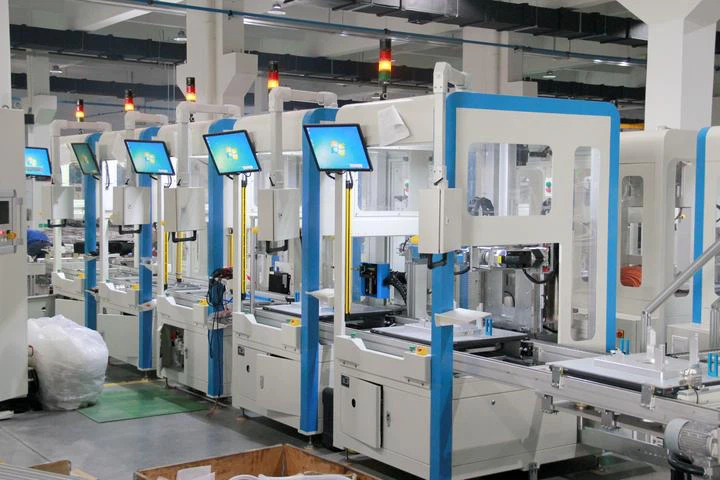
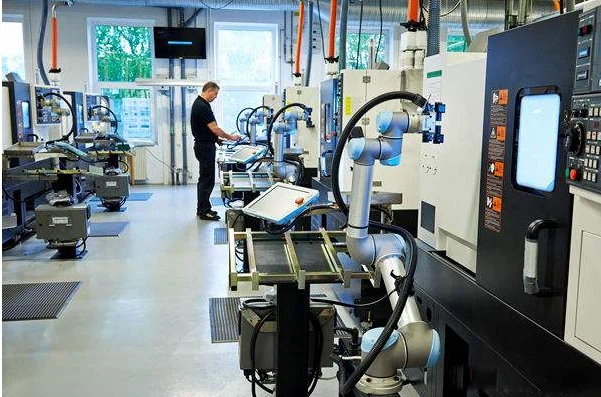
Many commercial and industrial manufacturers rely on industrial computers for robot guidance and machine vision. Industrial PCs can also collect data from equipment and machinery to implement processes for preventative maintenance.
Packaging Inspection & Quality Control
Packaging inspection and machine vision systems allow food packaging plants and other manufacturers to automate quality control processes, increasing efficiency and productivity.
Asset Tracking
Healthcare and retail sectors utilize industrial PC hardware in daily operations, tracking and monitoring processes and assets for any abnormalities or inconsistencies.
Simulation & Control
Industrial PCs have powerful processors that can create and emulate simulations of real-world scenarios, giving insights into:
Analyzing potential risks
Predicting future possibilities
Testing systems in any framework
Remote Data Management
Remote Internet of Things (IoT) sensors can send and receive data related to the use of remote equipment, hardware, tools, and other connected devices. Machine operators can deploy the sensors to collect actionable data regarding equipment fatigue, operational processes, and overall performance.
Chemical, Pharmaceutical, and Food Processing
Industrial computers can operate reliably in hazardous areas where flammable vapors and chemicals are present. They can be purged to be made safe for these volatile environments. Often aseptic, industrial PCs can be cleaned with high pressure for use in sterile environments.
OEMs
Industrial PCs allow operators to send controls and commands for systems and machinery, display data from them, or both. Equipped with a user-friendly human-machine interface (HMI), industrial computers facilitate the easy control and monitoring of industrial equipment.
Integrators
End users often contract system integrators to engineer, design, and install complete systems. Integrators are typically responsible for selecting and evaluating all components of an industrial computer system. Industrial PCs or HMIs are essential to an integrated industrial system.
How to Choose Industrial Box PC
Processing Power
Processing Power is determined by the type of processor used in your PC, as well as the Clock Speed and Core / Thread performance. There is not one thing that is wholly determinant of "processing power" – rather, it is the product of several factors.
Intel or AMD?
The two main players when most people think of PC Processors are Intel and Advanced Micro Devices (AMD), and for good reason. Both companies have been in the semiconductor game for decades and have many different CPUs for every conceivable use case.
Intel Processors are known for:
High performance on Single-core operations
Consistent performance across different applications and workloads
Low Thermal Design Power (TDP) features allow for use in wide ambient temperature ranges
Processor-intensive applications
Ability to be "overclocked" – speeding up the CPU performance in certain use cases
AMD Processors are known for:
High Performance with Multi-core operations
Modular Processor design
Compatibilities with PCIe 4.0 (Offers faster data bus transfer speeds for some SSDs and high-end graphics cards)
Great Performance-Price value proposition
Clock Speed
The measurement of the number of cycles a CPU operates per second is called Clock Speed, and it is measured in Gigahertz (GHz). Generally, the faster the clock speed of a processor, the higher performing the CPU.
Core / Thread Performance
Many processors today are dual core, quad-core, hex- or even octa-core, which means that there are 2, 4, 6, or 8 physical processing units making up the CPU itself. The more cores the CPU has, the more efficiently it can operate. Multi-core CPUs are ideal for multitasking, or running applications that require large amounts of processing instructions (threads); the CPU divides the processing requirement among the cores to efficiently process the data.
A thread is a virtual component that handles tasks of a CPU core to complete them in an effective manner. The more threads a CPU can execute at a single time, the more tasks it can complete. The CPU divides tasks into separate threads and runs them at the same time; this is called Multithreading. You and I know it as "multitasking" – doing two things at once.
SMT, or Simultaneous Multithreading (Hyperthreading™ is an Intel® trademarked term for the same process) enables resource-sharing of cores between two or more threads. This has the effect of allowing the processor to "double dip" cache memory and execution units, but it comes with an increase in CPU power consumption.
RAM
RAM (Random Access Memory) is one of the most important components in determining the performance of a computer system. RAM gives applications a place to store and access data on a short-term basis; storing the information your PC is actively using so it can be accessed quickly. The most common types of RAM used in today's Industrial PCs are DDR3L and DDR4.
DDRL3: DDR3L (Double Data Rate Type 3 Low Voltage Standard) RAM is a type of memory module that operates at a low 1.35V level and comes solely in a 204-pin length that was developed for laptop PCs. This type of RAM requires less power and generates less heat than traditional desktop RAM, making it the preferred RAM type for everyday mobile and embedded computing systems.
DDR4: DDR4 (Double Data Rate Type 4) RAM is a type of memory module that supports higher memory density than DDR3L, which means that more memory capacity can exist on a similar form factor. DDR4 RAM frequency is faster, which enables it to do more. Power consumption of DDR4 RAM is 1.2V, which makes DDR4 the ideal RAM for high performance applications in mobile/embedded computing.
Capacity: Most Panel PCs nowadays come with at least 4 GB of RAM, and many systems can feature up to 64GB of RAM. In fact, Microsoft requires a minimum of 2GB of RAM to be installed on a PC running Windows 10. However, for best performance it is usually advised to at least double Microsoft's minimum requirement.
Storage
The common 2.5" Solid State Drive (SSD) is one of the most recognizable Storage Devices today. SSDs are prominent features of Industrial PCs because they feature no moving parts, unlike traditional hard drives. This means a higher level of vibration resistance and a longer-lasting component.
SATA, MLC: Serial-ATA (SATA) Interface simply refers to the methodology of how information or data is transferred to and from the storage device. The current SATA standard, SATA3, operates at 6.0 Gb/s.
Where SATA is the interface of how information is transferred, MLC is the structure of how the physical memory modules within the storage device are arranged. MLC stands for multi-level cell, and an MLC storage device is commonly defined as an SSD which can store two bits of data in each cell.
NVME, 3D TLC: Nonvolatile memory express (NVME), like SATA, is an interface protocol - the blueprint of how data and information is transferred between the storage device and other items in the system such as the CPU and the RAM. NVME delivers higher bandwidth performance compared to SATA storage and as a result is ideal for high performance data storage and processing.
TLC is the structure of a Solid State Drive that features three bits of data in each cell. 3D TLC arranges the physical memory cells vertically, hence the 3D moniker. Vertical stacking of the cells means higher memory density, and 3D TLC drives consume less power than other types of Solid State Devices.
Capacity: As with RAM, storage capacity is integral to the system. Many Industrial Panel and Box PCs available today come with a minimum storage capacity of 32 or 64 GB, and the SSD capacity can be up to 1TB or more. When assessing your storage requirements, don't forget that the PC's Operating System will take up a good chunk of space for itself as well, so it's always a good idea to see Microsoft's Minimum Hardware requirements if you're thinking about using a Windows® OS.
Operating System
Windows 10: This Operating System is one of the most recognizable in the world, thanks to its creator, Microsoft. Windows 10 in an Industrial PC typically has the same user-interfaces as Windows 10 on a personal machine.
Windows 11: The newest version of the personal Windows OS is also available in the industrial space, and, like Windows 10, the user experience is equivalent to a personal PC. Windows 11 is more security-minded, and to run Windows 11, an industrial PC must meet several hardware security requirements:
TPM 2.0 (For support of newer cryptographic algorithms and multi-factor authentication).
SecureBoot (Prevents unauthorized third-party bootloaders from compromising the system in the Boot phase).
Core Isolation (Provides added malware protection by isolating computer processes from the operating system and device).
Embedded / Non-Embedded / Professional: Embedded and Non-Embedded Operating Systems are typically Enterprise-level versions of the equivalent OS, and many times the user will notice no functional difference. With Enterprise level systems, the OS update schedule is typically not as frequent, and can be managed by the Network Administrator. Enterprise level embedded and non-embedded operating systems have a longer support lifecycle than consumer versions of the same OS, which provide the security in knowing your OS will be supported for years to come.
Professional versions of the Operating System are the exact OS just like on a personal laptop or desktop. It's the full version, with all updates on the more frequent consumer schedule.
Linux Ubuntu: Linux is a kernel – a backbone – of many open-source Operating Systems, such as Ubuntu. Ubuntu is one of the most popular Operating Systems due to its open- source nature, which allows for users to modify its code or distribute and install the customized OS without licensing requirements.
Ubuntu is a great option for programmers and developers that wish to use proprietary software or otherwise customize aspects or features of the Operating System they would not be able to do with Windows.
Display Properties
How big a screen do you want to have on your PC? Do you want to be able to use the screen as a touch input? How bright do you want the screen to be? Do you want to be able to see the display from an angle? What the heck is Optical Bonding?
These are the many questions that customers of Industrial PCs ask themselves. The display selection process is just as important as the CPU and RAM – after all, a small 7-inch display may not be suitable for a large factory environment, while a 21.5" high brightness display may not be the right choice for a smaller assembly station.
Screen Size and Resolution: Many Industrial Panel PCs have screen sizes as small as 7.0" measured diagonally, and can go upwards of 21.5", with many sizes between. As a rule, the larger the screen size, the higher the resolution. Screen resolution is like real estate – the higher resolution a display has, the more it can show.
Touch Operation: Many of today's Industrial Panel PCs have touch screens, eliminating the need for a mouse and keyboard. There are two types of touch inputs, Resistive and Capacitive.
Resistive touch screens use two layers separated by air or an inert gas. When the user presses the screen, the film indents and the materials touch at that point. The layers are conductive, so the system registers the difference in voltage as a touch in that location. Resistive touch screens need occasional calibration to accurately register the touch inputs. Since these screens operate via physical pressure, any object can be used to register a touch – fingers, stylus, or even screwdrivers (though that's not recommended, of course)!
Surface Capacitive Touch (Capacitive) is the first generation of capacitive touch screen technology. This basic capacitive technology features one conductive layer under a thin protective coating. A user touches the screen, and the conductive finger/ object alters the electromagnetic field; this alteration is what the system registers as a touch.
Projected Capacitive Touch (PCAP) is the method of touch input used today on smartphones, tablets, and PCs. The touch screen is an array of conductors that create an electromagnetic field on one or more conductive layers. Because of the positioning of the sensors in PCAP screens, they are more accurate compared to their surface capacitive siblings.
PCAP screens have the benefit of supporting gestures and multi-touch actions such as swiping or pinching in and out to zoom correspondingly. Surface Capacitive and Resistive touch screens only support single-touch operation.
Brightness: Standard display brightness ranges from 250-450 nits (a nit is a unit of measurement that describes how bright a display is), though the official term is candela per square meter (cd/m2). A range of 250-450 nits is typical for indoor use, whereas displays featuring "sunlight readability" will typically have ~ 1000nits of brightness. These high brightness displays are usually found outside, or in places with lots of sun glare.
Backlight Lifetime: Standard display brightness ranges from 250-450 nits (a nit is a unit of measurement that describes how bright a display is), though the official term is candela per square meter (cd/m2). A range of 250-450 nits is typical for indoor use, whereas displays featuring "sunlight readability" will typically have ~ 1000nits of brightness. These high brightness displays are usually found outside, or in places with lots of sun glare.
Viewing Angle: With an Industrial PC display, it may not be feasible to look directly at the screen at the optimal 90* perpendicular viewing angle. Many IPC displays allow for a wide viewing angle (measured as degrees off-perpendicular in 4 directions: Top, Bottom, Right and Left). The higher the angle in each direction, the more off-center the viewer can be, yet still clearly see the display.
Optical Bonding: Often pairing with high brightness / sunlight readable displays due to glare- reduction properties, optical bonding is the process of applying a layer of resin between the LCD and the touch panel or glass of a display, bonding them together with no air gaps. Optical bonding is a great option for use in harsh application environments such as outdoor, marine, or other places where a rugged display is an ideal requirement. Optical bonding eliminates the chances of getting humidity/moisture build-up between the glass and the screen.
Certificate
Products Description
Frequently Asked Questions
Q: What is the difference between a PC and an industrial PC?
Q: What is the use of industrial panel PC?
Q: What are the different types of industrial computers?
Q: Are industrial PCs more expensive than PLCs?
Q: How to choose an industrial computer?
Q: What are the advantages of using Industrial PCs?
Durability: They can withstand harsh environmental conditions.
Reliability: Designed for continuous operation in industrial settings.
Flexibility: Often support for a wide range of I/O interfaces and expansion options.
Longevity: Designed for long-term use with extended product life cycles.
Compatibility: Can often integrate with existing industrial automation systems.
Q: What are the different types of Industrial PCs?
Q: What industries use Industrial PCs?
Q: What factors should be considered when selecting an Industrial PC?
Q: Can Industrial PCs be customized?
Q: What operating systems do Industrial PCs support?
Q: How do Industrial PCs differ from commercial PCs?
Q: What is the lifecycle of an Industrial PC?
As one of the leading industrial box pc manufacturers and suppliers in China, we warmly welcome you to buy high-grade industrial box pc from our factory. All customized products are with high quality and low price.
Industrial Wall Mount Panel PC, Industrial Mini PC Fanless, Industrial Panel Mount Computer