


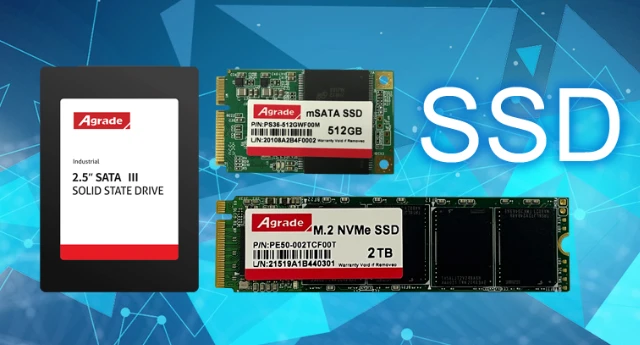
Upgrading a computer system or laptop from an HDD to an SSD (Solid State Drive) can significantly improve its performance. This is because SSDs are much faster than traditional HDDs because they access data in flash memory digitally, unlike HDDs which use physical mechanisms to read data from magnetic strips.
Why are SSDs faster than HDDs?
Solid-state drives (SSDs) essentially function like RAM or memory in a computer. They both use integrated circuits or chips to store data, making them significantly faster than hard disk drives (HDDs). However, while RAM is volatile-meaning it loses its stored data when the system loses power-SSDs are non-volatile. They retain their stored data even after the system is shut down.
Due to their superior performance, many users are replacing or supplementing the hard drives in their desktops and laptops with SSDs. This reduces operating system loading times and speeds up the execution of applications and tasks.
SATA SSDs are the most common type of SSD. These SSDs connect to computers using the SATA (Serial Advanced Technology Attached) interface. Modern hard drives also use the SATA interface. SATA was first introduced in 2000 as version 1.0 (SATA I), with transfer speeds up to 1.5 Gbit/s. The SATA standard was revised to 2.0 (SATA II) in 2004, supporting speeds up to 3.0 Gbit/s.
SATA SSDs are the most common type of SSD. These SSDs connect to computers using the SATA interface. Modern hard drives also use the SATA interface. SATA was first introduced in 2000 as version 1.0 (SATA I), with transfer speeds up to 1.5 Gbit/s. The SATA standard was revised to 2.0 (SATA II) in 2004, supporting speeds up to 3.0 Gbit/s.
Most laptops and desktops today use SATA 3.0 ports (SATA III), supporting transfer speeds up to 6 Gbit/s (600 MB/s). These are used to connect HDDs, DVD drives, and SSDs to desktops or laptops. SATA SSDs use the SATA III interface to connect to computers or laptops. These SSDs typically have read/write speeds between 450-550 MB/s, which is significantly faster than the 70-200 MB/s read/write speeds of SATA III HDDs.
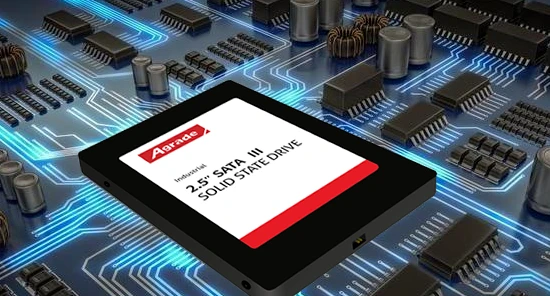
SATA 3 SSDs have the same form factor as 2.5-inch hard drives and can be easily installed in most older laptops or desktops to replace internal HDDs and improve their performance.
mSATA or Mini-SATA SSD
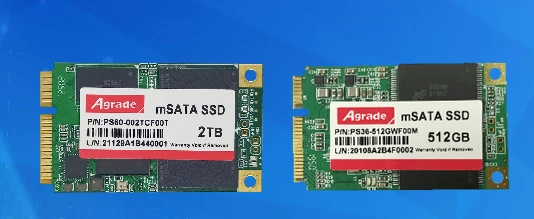
mSATA or mini-SATA SSDs offer similar performance to SATA3 SSDs, but their connectors differ slightly, hence the name mSATA. They utilize the mSATA connector, released in September 2009, which is smaller than the standard SATA connector.
Its design prioritizes a small form factor for devices that can easily accommodate solid-state drives. mSATA SSDs are smaller than SATA SSDs, making them suitable for space-constrained computing devices.
NGFF M.2 SSDs are often referred to as M.2 SSDs, although M.2 is the name of the connector used. NGFF (Next Generation Form Factor) is a replacement specification for the mSATA standard. It's an improvement on the mSATA standard, using a new M.2 connector that supports a variety of devices. The M.2 connector is not compatible with mSATA devices.
While the mSATA interface only supports different versions of SATA (i.e., SATA 1.0 to SATA 3.0), the M.2 connector allows the use of SATA 3.0, USB 3.0, and PCIe devices on the motherboard. NGFF M.2 SSDs share the same specifications as SATA and mSATA SSDs, but use a different connector. Their read and write speeds are comparable to SATA 3 and mSATA SSDs, offering similar performance improvements. SATA NGFF M.2 SSDs are a good choice for users with desktops, laptops, or computing devices that have M.2 slots.
They are ideal for users who don't want to replace their existing hard drive in their laptop but still want the performance boost from an SSD. Because NGFF M.2 uses a different connector, you can keep your current drive and still install an additional SSD.
NGFF M.2 SSDs are priced slightly higher than SATA SSDs but comparable to mSATA SSDs. Modern devices, including desktops, laptops, ultrabooks, and notebooks, all have M.2 slots. All M.2 slots support NGFF M.2 SSDs.
M.2 SSD length
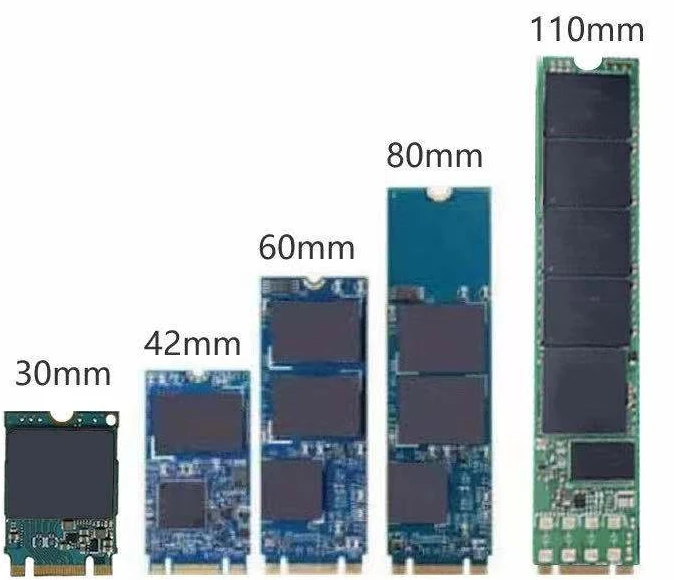
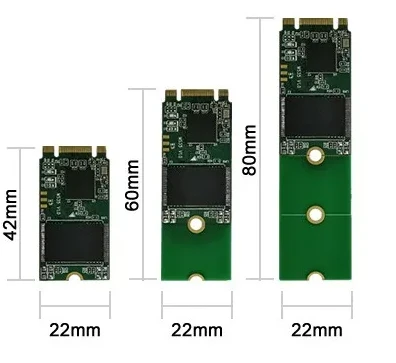
Another important aspect to consider when choosing an NGFF or NVMe PCIe SSD is the length supported by your device's motherboard. M.2 and NVMe SSDs are 22mm wide, but their lengths differ. Depending on the manufacturer, lengths can be 30, 42, 60, 80, or 110mm. Some motherboards, especially those for netbooks and tablets, may support 30 or 42mm SSDs, while desktop motherboards can accommodate up to 110mm M.2 drives. The motherboard will indicate the supported size along with markings indicating the SSD's mounting screws.
Performance differences between similar solid-state drives
Within each of the above categories, there are various types of solid-state drives (SSDs). They differ in specifications and performance. A SATA 3 SSD from one brand may perform worse than one from another, and the same applies to NGFF and NVMe drives. There are compatibility issues involved, and users need to ensure that the SSD they purchase meets their requirements.